Word Not Responding

Summary:

Have you ever encountered the Microsoft word not responding error but still do not know how to fix it? Have you tried reinstalling the World program or even deleting the document? Stop doing that, just follow these 8 solutions to Microsoft word not responding error.

Since Microsoft developed Word, Excel, and PowerPoint, it has become the most famous official work tools. Every Windows and even Mac computer will install the Office suite when it runs for the first time. Especially when the word program has been updated from 97 to 2003, 2006, 2010, 2013, 2016, etc. Microsoft Word is a must-install program no matter you are working for an enterprise, government or staying at home.

Hence, that’s why when you browse the Internet, you will find a lot of questions related to how to fix Microsoft Word error, such as Microsoft word has stopped working, Microsoft error when an opening file, etc. Microsoft word not responding error is just one of the thousand demands on fixing office errors.

Today let’s focus on Microsoft Word not responding error and figure out 8 solutions to fix this error with steps.

8 Solutions to Fix Microsoft Word Not Responding Error

Solution 1. Reopen Microsoft Word in safe mode

Click Start menu and then find Microsoft word program >> press CTRL and hold this key >> Click Microsoft World program icon

Solution 2. Use safe option before launching Microsoft word program

Press WIN+X and then choose Command prompt >> Enter to the path where you installed the office in CMD window >> Type Winword.exe /safe >> Open the Microsoft word in safe mode.

8 Solutions to Fix Microsoft Word Not Responding error

Solution 3. Disable Add-ins to fix Microsoft Word Not Responding error

After reopen Microsoft Word in safe mode >> Click file menu >> Option >> Add-ins >> Disable all third-party add-ins

Solution 4. Repair Microsoft Word with Programs and features function

Press WIN+R and then input appwiz.cpl to run Programs and features >> Find the Microsoft installation program in current window >> Right-click the program and select Change >> Choose Repair in the pop up window >> Restart the computer

Solution 5. Try Microsoft Office embedded Recovery tool

Click Start button >> All programs >> Microsoft Office Tool >> MS office application recovery >> Choose the document that’s not responding >> Click Recovery application

Solution 6. Delete Recently Windows Updates

Press WIN+R and then input appwiz.cpl to run Programs and features >> Turn to View installed updates >> Delete Recently Windows updates related to office

Solution 7. Change default printer

Press WIN+X and then choose Control Panel >> Devices and printers >> Select another printer >> set as default printer

Solution 8. Use third-party free data recovery software to recover lost documents

Sometimes, when accidentally deleting the documents, you will encounter Microsoft Word not responding error without sending to the Recycle Bin. The word documents have not been lost and indeed the contents of the documents still exist there unless you have already created new documents in the same place to overwrite the deleted documents.

Thus, in order to make sure the deleted documents can be recovered with a higher success rate, you have to stop creating, copying, downloading new documents or data onto the same place to prevent permanent data loss.

Download the Bitwar Data Recovery software — a powerful office data recovery tool which you can easily and quickly recover the .doc, .docx, .xls, .xlsx files after accidental deletion.

How to recover lost documents with Bitwar Data Recovery

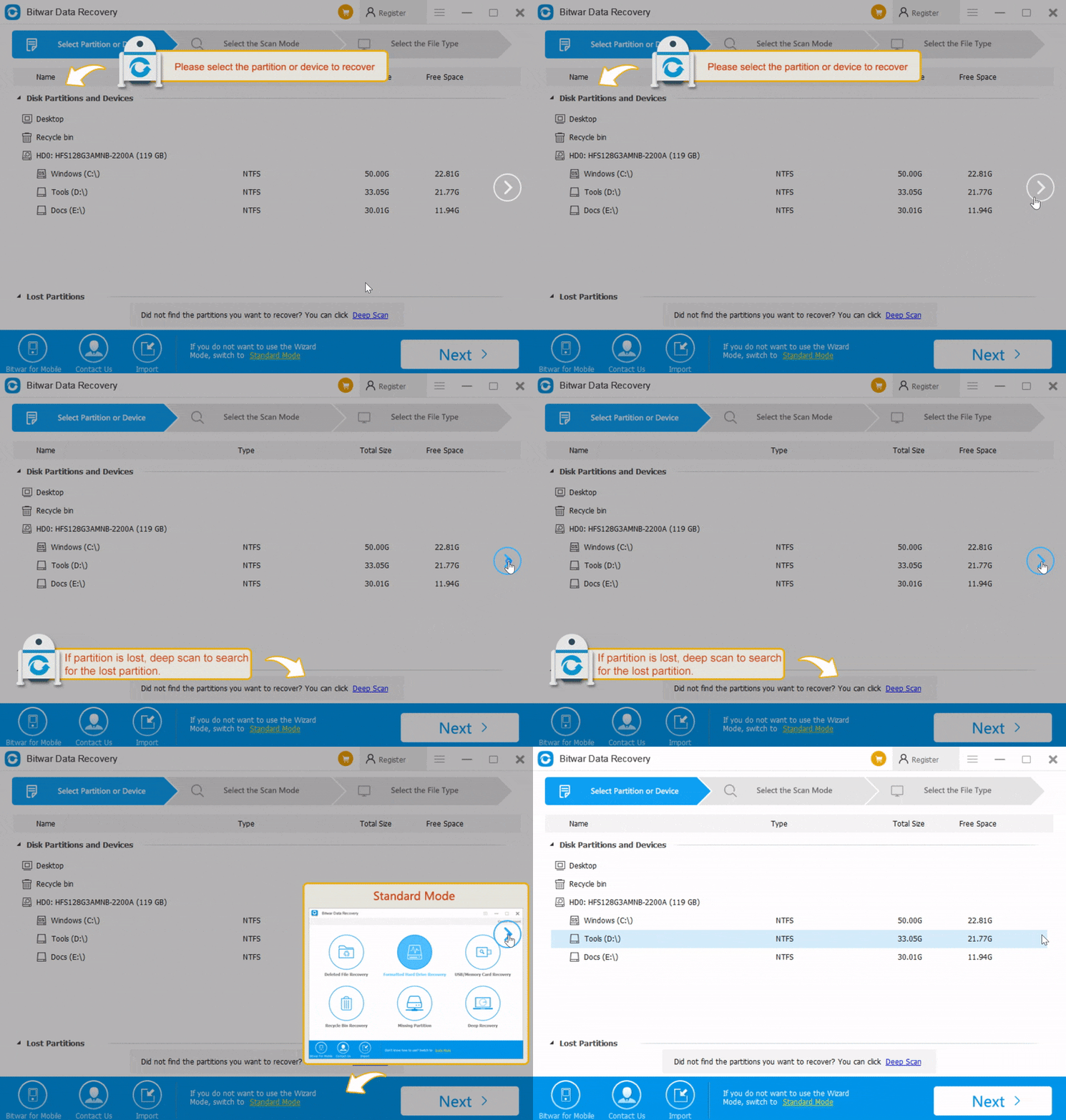
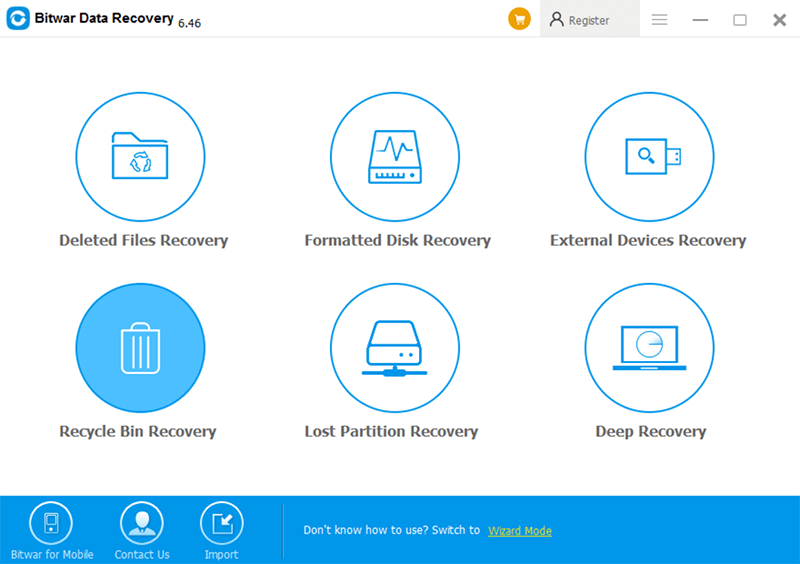
  • Step 1. Launch Bitwar Data Recovery Software and then choose the partition or device where has the lost documents.
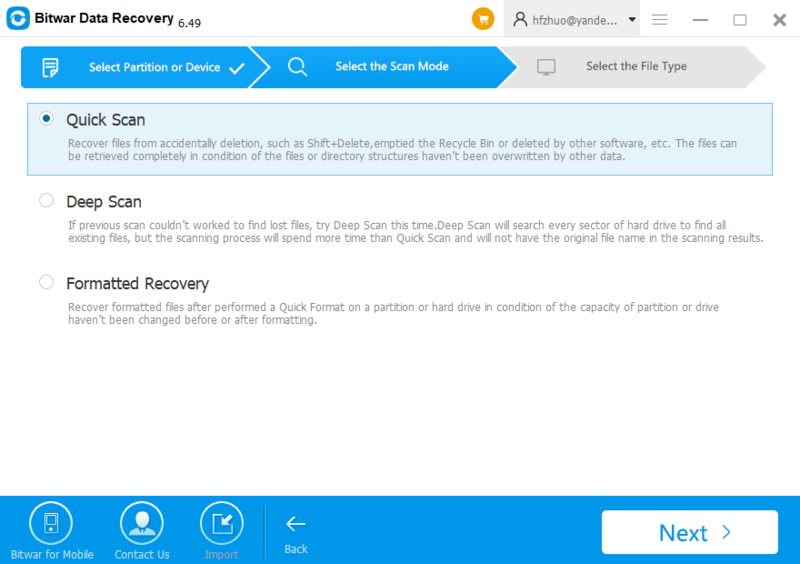
  • Step 2. Choose the Quick Scan and then click Next.
  • Step 3. Choose types of documents to shorten the scanning time and then click Scan.
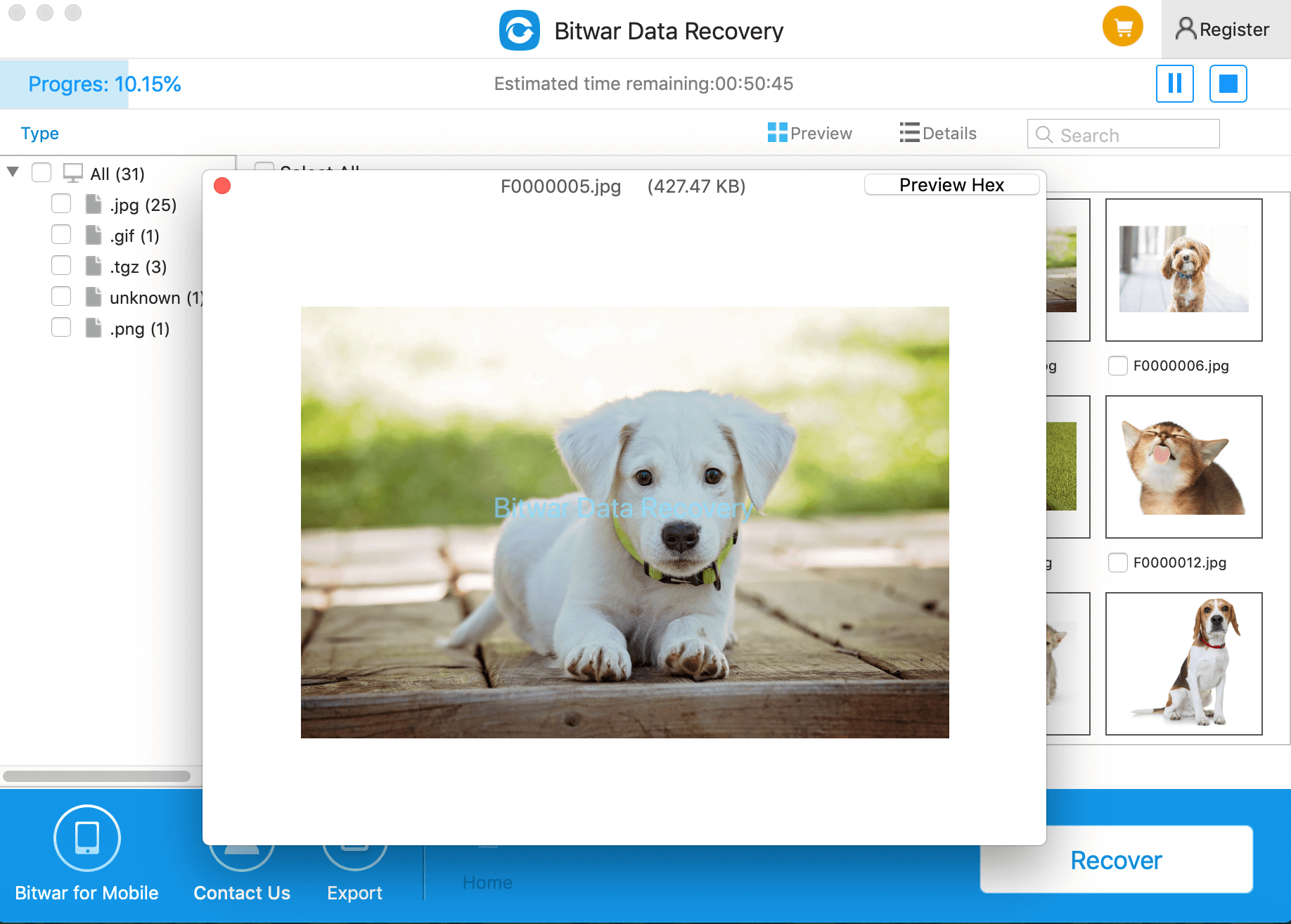
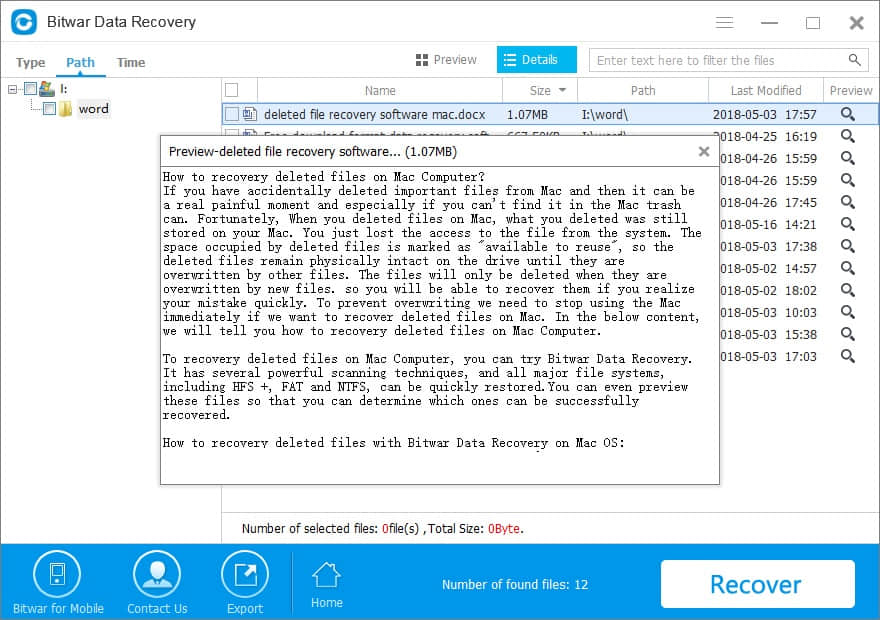
  • Step 4. Double Click to preview the scanned document and check whether it is exactly as you need. Hit Recover if necessary.
8 Solutions to Fix Microsoft Word Not Responding error

Please refer here for more about Word data recovery.

Recover Missing Files

Summary:

Have your desktop folders or files disappeared from Windows 10? You might lose your users’ files or personal documents, pictures, videos, installed programs, games, etc. This article will tell you how to recover lost data from Windows 10.

Windows 10 becomes very hot since its release. However, have you ever had the experience of suddenly losing important files in Windows 10 without knowing the exact cause? You may have opened the folder and then try to view or edit the files, only to find they disappeared. Why?

Why Files Disappeared on Windows 10?

Following are the most common situations in which you might lose your users files or personal documents, pictures, videos, installed programs, games, etc.

  1. Windows 10 automatic upgrade or update (desktop files and installed apps are the most likely to be removed);
  2. The virus deleted or hid personal files;
  3. You logged in a new user account;
  4. The hard drive is failing;
  5. Mistakenly deleted;

Once you understand how files disappear, choose one of the following methods to recover deleted, hidden, or unknowingly lost files in Windows 10 without problems.

Three Ways to Recover Files Missing from Windows 10

1. Windows 10 automatic upgrade or update – Check the Users folder and Search different hard drive partitions for your files

After Windows 10 upgrade, certain files might be missing from your computer, however, in most cases, they are just moved to a different folder.

Users report that most of their missing files and folders can be found at This PC > Local Disk (C) > Users > User Name > Documents or This PC > Local Disk (C) > Users > Public.

After upgrading to Windows 10, your hard drive letters might change for some reason. For example, if you used to store files on your C drive, they might be moved to D:\Users\Your_username folder on any other hard drive partition. In order to locate your missing files and folder, make sure to check all hard drive partitions thoroughly.

2. Hidden personal files– Show hidden files and folders

If your files and folders disappeared, maybe you should check for hidden files and folders. Sometimes, files and folders might appear missing, but they are actually hidden. To show hidden files and folders, do the following:

  • Press Windows Key + S and type File Explorer. Choose File Explorer Options from the list.
  • When File Explorer Options window opens, go to View tab. Locate Hidden files and folders option and select Show hidden files, folders, and drives.
  • Click Apply and OK to save changes.

After you’ve changed this option, try searching for the missing files and folders on your computer. In most cases, the files should be in the same folder where you left them.

3, You logged in a new user account – Switch to your old user account

In some cases, files and folders might disappear when you upgrade to Windows 10 and that’s because Windows 10 creates a new account for you by default. Your old account is still present, but it’s not set as the default account, so you have to switch to it. To do that, follow these steps:

  1. Click the Start Button and click your username at the top.
  2. You should see another account available on the list. Click it in order to switch to it.
  3. After you switch to it, all your files and folders should be available to you.

How to install Bitwar Data Recovery

Download and install this powerful data recovery software and follow the below steps to recover files disappeared on Windows 10.

Steps to recover data with Bitwar Data Recovery

Step 1: Launch Bitwar Data Recovery and select a recovery mode. If you have no idea about the data lost reasons, go to Standard Mode and there have already listed several common data recovery solution. Alternatively, you can click on “Wizard Mode” and choose the partition where have your loss of files.

Please refer here for more about data recovery.

Convert PDF to HTML

HTML format can be easy and complicated at some time because of text and code in the format. PDF files can be converted into HTML format as well by using Deli PDF Converter. If you want to convert your PDF to HTML, refer to the article below and you can convert your PDF files easily and quick.

Steps to Convert PDF to HTML

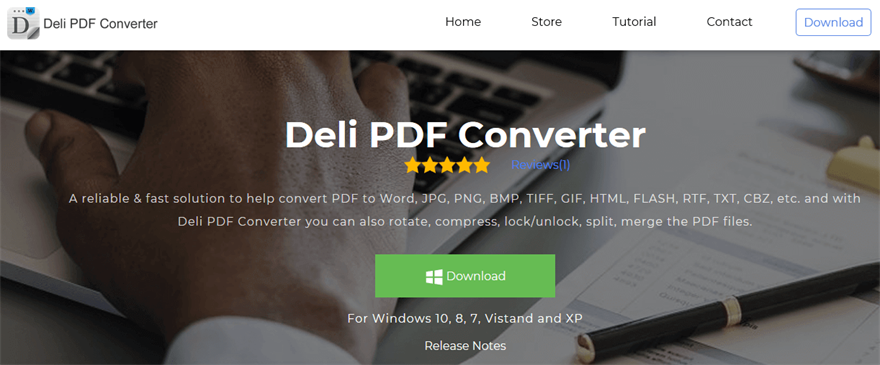
Before we proceed, please remembers to download Deli PDF Converter from the official website: https://www.pdfcword.com/.

Homepage

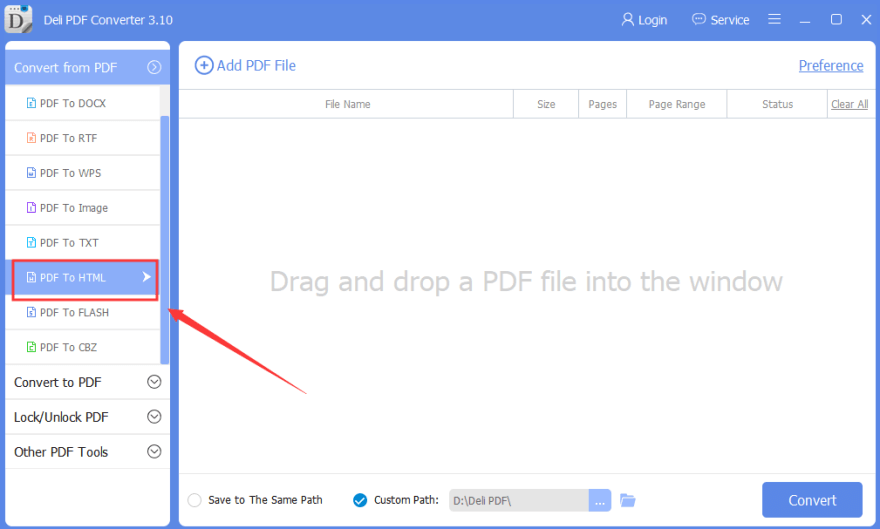
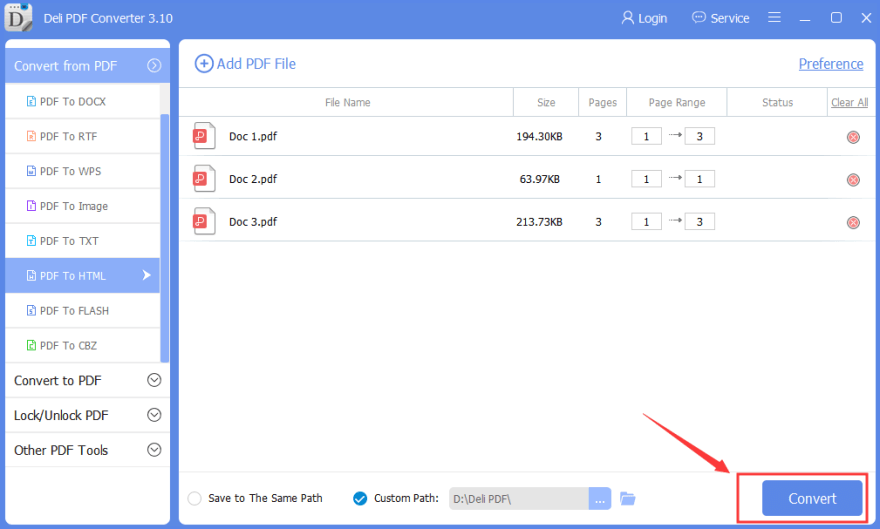
Step 1. After you install on your computer, open the software and choose “PDF to HTML” on the main interface.

PDF to HTML

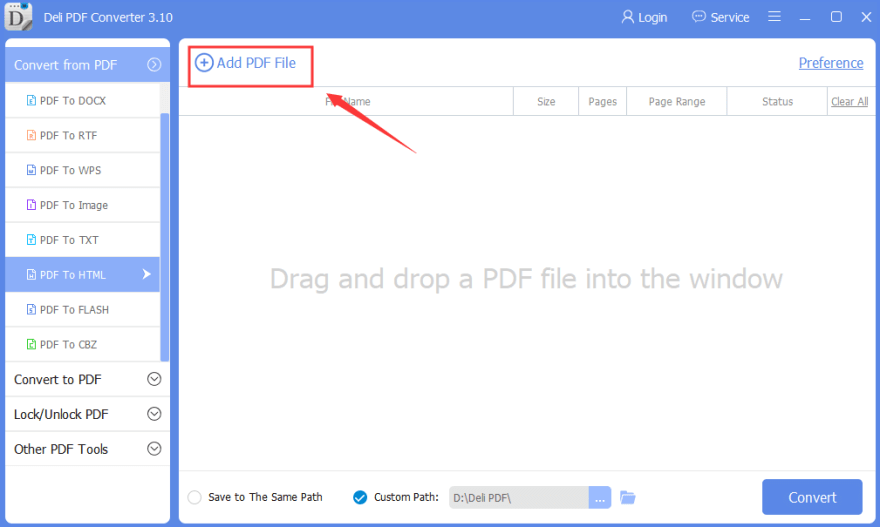
Step 2. Then, click “Add PDF Files” on the top of the interface to add in the files that you want to convert.

Add PDF HTML Files

Step 3. After finish adding your files, click “Convert” to start the conversion.

Convert HTML File

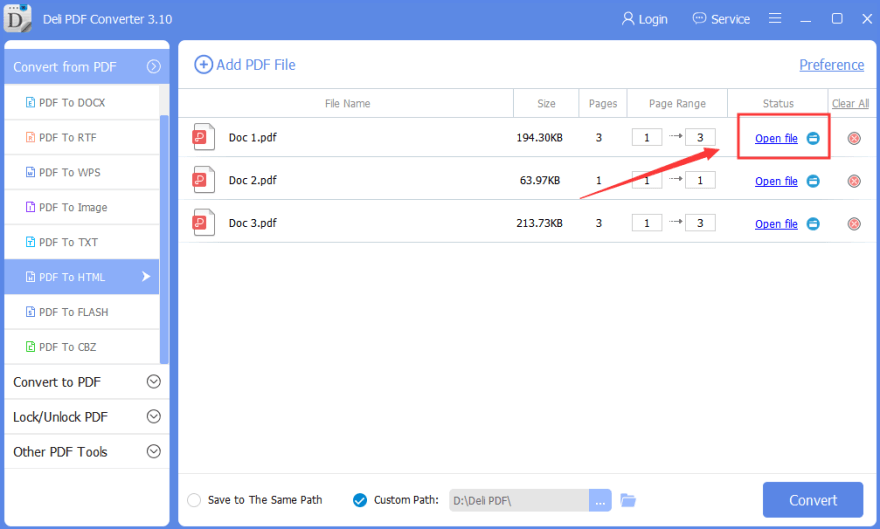
Step 4. After conversion, you can open and preview the converted file by clicking the “Open File.”

Preview HTML Files

Please refer here for more about PDF Converter.

DiskWarrior Mac Free

Summary

Are you trying to download DiskWarrior mac free with crack with the latest license code, serial key, keygen, serial number, activation code, registration code, kickass, etc.? Here’s a safer data recovery software alternative of DiskWarrior for Mac.

We all know that data loss can happen on everyone’s computer which makes us annoyed. How to rescue lost data?

First, please keep in mind the importance of making backups. Secondly, you should be careful when deleting files, make sure that the information you are about to delete is indeed the one you don’t need.

However, we may forget to make a backup when busying or due to many other reasons. When data is lost, and there is no backup, we often search online for free data recovery tool just as the Free Mac DiskWarrior.

DiskWarrior’s reviews are good, especially when files are accidentally deleted. However, DiskWarrior only supports Mac version. If you suffer from data loss on Mac, you can consider purchasing the license from the DiskWarrior official website. However, If you want to recover data on both Windows and Mac devices, the Mac DiskWarrior is bot available. So here we strongly recommend the Bitwar Data Recovery Software, which can recover deleted or corrupted data from Windows, Mac, Android, and iPhone.

Safe & Free alternative of free Mac DiskWarrior Crack

It’s also not a smart choice to use free Mac DiskWarrior crack with the latest registration code, keygen, serial number, activation code, license key, kickass, or full version online. The reason is that the computer will possibly be destroyed by the virus, Trojan. Or your private info will be exposed by some backdoor, spyware, or malware that packaged with crack version.

That is terrible, but why not using the best free DiskWarrior alternative for Windows and Mac? Just download another safer and free alternative software – Bitwar Data Recovery.

Bitwar Data Recovery shall be the most reasonable choice of DiskWarrior when it comes with a 30-day free trial. It can fully recover your audios, videos, pictures, archives, emails, and documents from any devices such as digital camera, hard drives, SD cards, memory cards, phones, media storage mediums. Whether you deleted these files or lost them due to the virus, or due to formatting, or virus infection, you can still have them back using this software. Moreover, this program provides three ways to preview files before recovery.

How to install Bitwar Data Recovery

Free download and install this powerful data recovery software and follow the below steps to recover data.

How to recover deleted or lost files with Bitwar Data Recovery

Step 1. Launch the software and select your partition or device where you have lost data and then click “Next.”

Step 2. Choose a scan mode and then hit “Next.”

The best DiskWarrior free alternative for Windows and Mac OS X

Step 3. Choose the exact types of files you have lost, and then click “Next” to start the scan.

The best DiskWarrior free alternative for Windows and Mac OS X

Step 4. Double-click the scanned out the file to preview. It’s a powerful preview function helps you to shorten the recovery time. Then select the files you want and click Recover to save it to another partitions or devices.

The best DiskWarrior free alternative for Windows and Mac OS X

Please refer here for more about Mac data recovery.

Can you Download Netflix Movies on Mac

Summary:

Can you download Netflix shows on Mac? Want to watch download Netflix movies on the Mac so you can watch them offline? Here our guide shows how to download Netflix on Mac and introduces you the best data recovery tool to recover your lost data.
 
With over 100 million subscribers worldwide, Netflix is one of the most popular streaming services in existence, and it continues to grow every year. As the most prominent American entertainment provider of Internet streaming media and video-on-demand online and DVD by mail, NetFlix generates incredible shows and movies that can be watched on your TV, Smart TVs, PlayStation, Xbox and so on, and even available to watch instantly or download for later on phone/tablet, such as Google Chrome, Mozilla Firefox, Opera, or Safari browser.

How to download Netflix movies?

To download movies from Netflix on iOS or Android device, you’ll need a few things:
 
– An active Netflix subscription; so you can’t keep a download after you cancel your subscription.
– A device that supports Netflix. However, not all devices that can run Netflix offer this. For this article, we’ll focus on the iPad and the Mac. 

– A movie or TV shows that has a download option. Most items on Netflix do, but not all.
 
Once you’ve watched the movie or TV show, or if you didn’t view it and want to remove it, tap the Download icon, then tap Delete Download.

Can you download Netflix on Mac?

The answer is still no, unfortunately.
 
Unlike the iPad, downloading Netflix to a Mac is a bit harder since Netflix doesn’t support downloading and offline watching on Mac, because Netflix believes people won’t use it that way, or because download Netflix movies on the Mac are pirating content, which is illegal. Don’t fall into the trap of thinking that there’s no malware that targets Mac OS.
 
If you are here because you’ve visited one of those sites and downloaded a fake version of Netflix, infecting your Mac computer with malware and possibly even losing essential data, we know how annoying it is to lose your profile and the viewing history there because so far there is no NetFlix recovery tool available. So you may need to immediately download the best video recovery software to recover them.
 
Bitwar Data Recovery for Mac is a user-friendly data recovery suite for Mac OS that can recover all lost files from any storage device. It can recover lost or deleted files, photos, audio, music from any storage device effectively, safely and completely.

How to recover lost deleted NetFlix profile with Bitwar Data Recovery for Mac?

Free download and install Bitwar Data Recovery on your Mac OS now. It is compatible with OS X 10.11 and later. Then, follow the steps to perform lost data recovery quickly and safely.

Step 1: Select the Partition or Device

Launch the program and select the disk location where your files deleted by Netflix pirating content and then click “Next.”

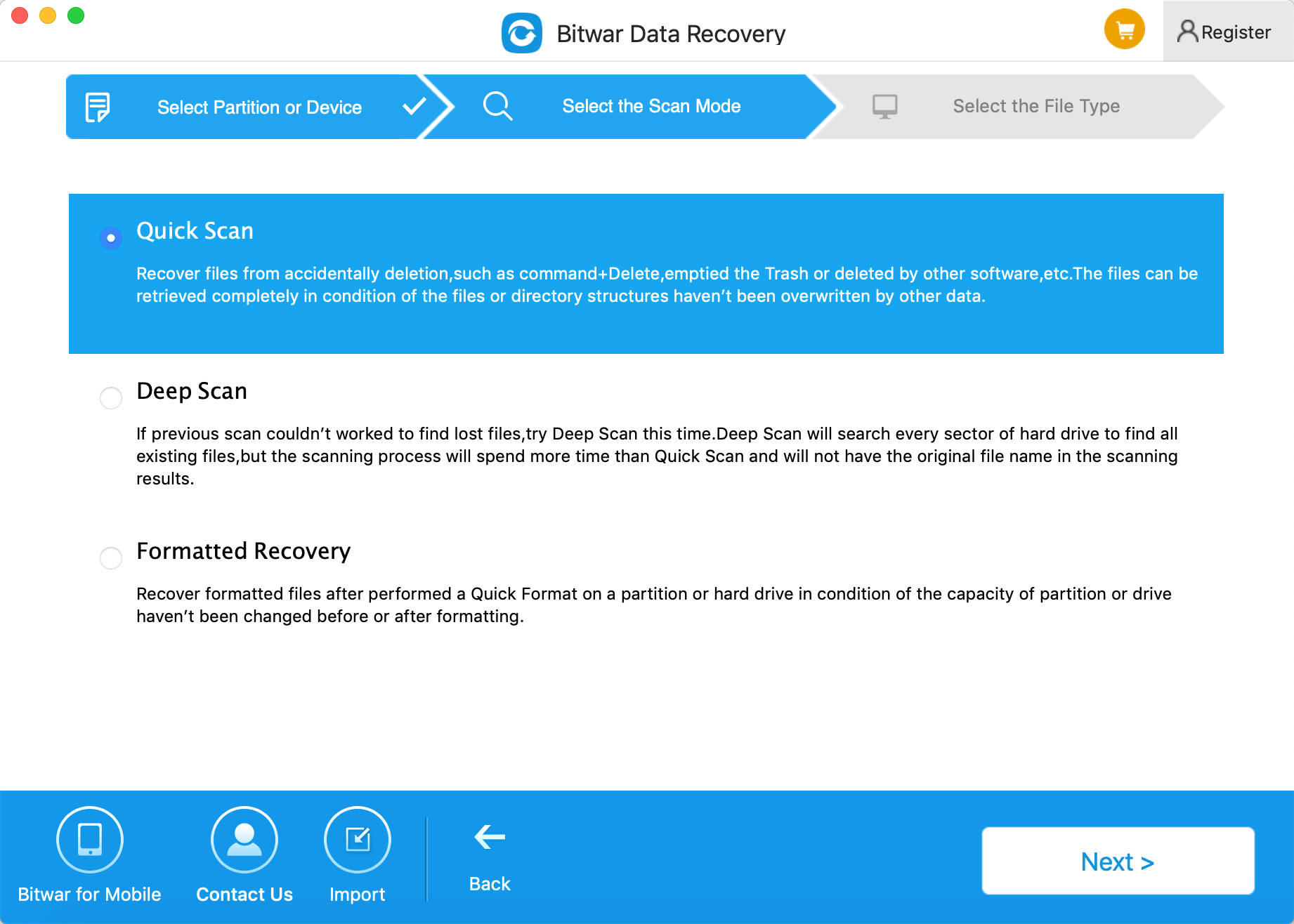
Step 2: Select the Scan Mode

The Quick Scan mode can recover deleted files on a partition or device, such as files deleted by Command + delete, deleted by other software, or emptied from the trash, etc. So select “Quick Scan” and click “Next.” If files could not be scanned out by “Quick Scan,” try “Deep Scan.” Deep scan will search every sector of the hard drive to find all existing files.

4079980874?profile=RESIZE_710x

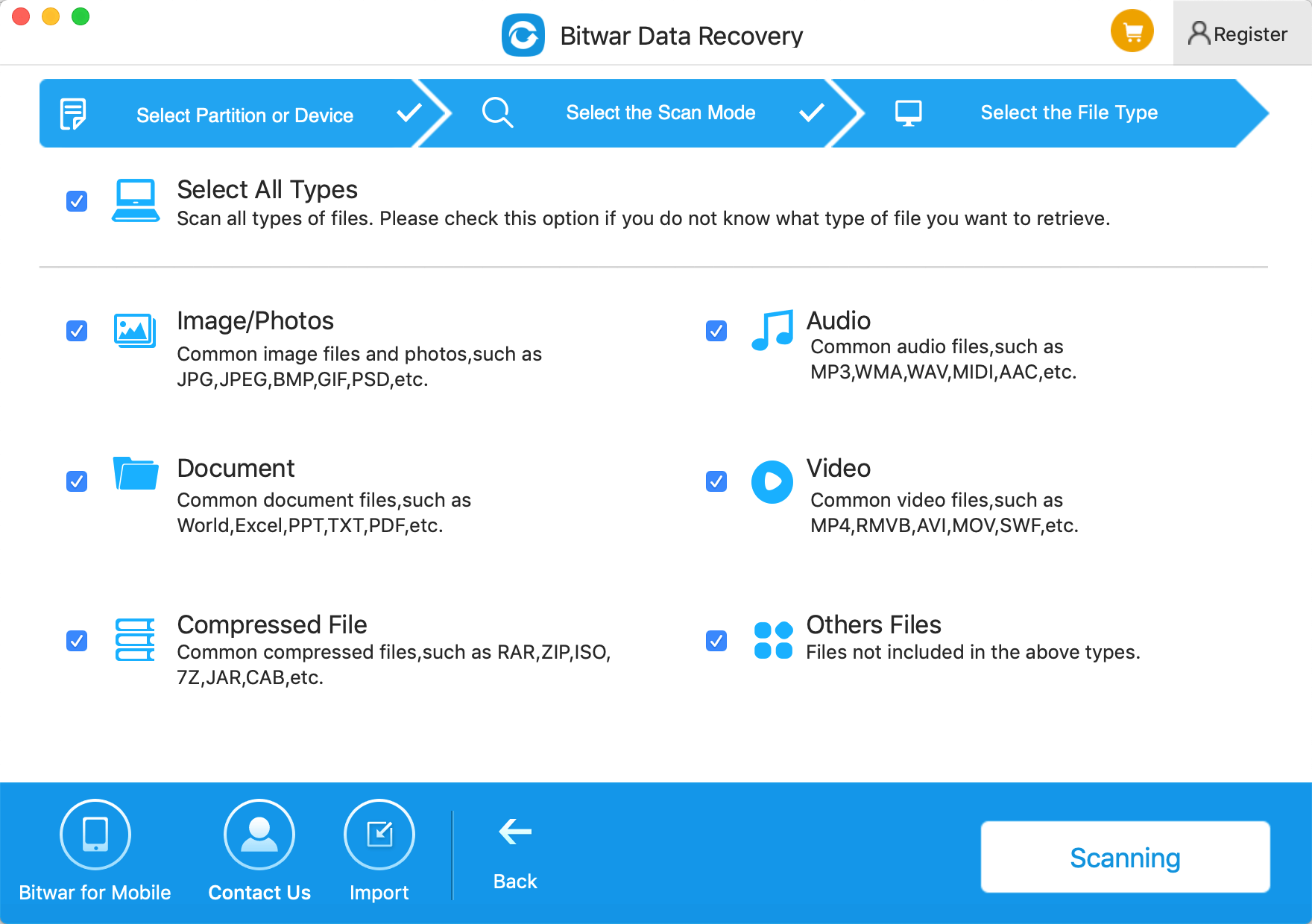
Step3: Select the file type

Select the file types to which lost file belongs. Then click “Next” to perform an automatic scan.

Step 4: Preview, recover and save files

4079985065?profile=RESIZE_710x

Please refer here for more about Mac data recovery.

Easeus Data Recovery Activation Code

Summary:

Have you ever found the Easeus data recovery crack for 12.8 right now? Moreover, seeing that Easeus Data Recovery Wizard 12.8 has limits on recovering lost data? Or, need 2019 best free data recovery software? Then, you are coming to the right place, here is the best free and full version alternative file recovery software for you to retrieve deleted or lost files.

4058997864?profile=RESIZE_710x

How to Get Easeus data recovery crack?

Easeus is one of the leading data recovery companies that developed the data recovery wizard since 2004, with decades of development, the latest version of Easeus data recovery wizard 12.8 becomes the hot pick in the computing world. However, the license of Easeus isn’t cheap that should take you over $69.95 to purchase.

There are many people now searching the Easeus data recovery crack with the serial number, kickass, keygen, license key, license code, activation code from Google to help them restore the loss of data. However, I am not forcing you to waste of your precious time on finding the Ease Data Recovery Crack!

The reason is Easeus data recovery wizard is a data recovery tool as other data recovery software will achieve the same goal. Most importantly, there’s no need again for you to worry about the viruses, dangerous backdoors bundled with the cracked version.

Stop Wasting Your Time on Easeus Data Recovery Crack

If you are keeping search in Google and click every website that claimed with Easeus data recovery software free download full version with the key, serial number, kickass, license code, keygen generator, activation code, etc., I have to say you are losing your precious data forever. Both of us have known that the data couldn’t be overwritten by new data; therefore, the best choice is to recover lost files soon as we can. Download, copy or write new data into the partition where have your lost files will cause permanent data loss, and you will lose your precious data forever.

Moreover, you have to prepare yourself to take the risk on the dangerous infection by virus, Trojan, malware, adware, backdoor that packaged with Easeus Data Recovery crack. Even worse that there will have a system crash, file corruption, personal data leak, and permanent data loss if you insist on using Easeus Data Recovery Crack.

Indeed, you deserve the 100% virus-free, 100% CLEAN and free data recovery software for windows 10, 8, 7, which can quickly help you restore the data you want.

Free data recovery software alternative to Easeus Data Recovery Crack

Here I strongly recommend you to use Bitwar Data Recovery, its step-by-step interface has clear enough guidance for any newbie users, first of all, you will feel no hassles on using the software, while the software is providing the animated feature instructions for the first run, which means, it can change your impression that the data recovery software isn’t only for experienced users to use.

Easy data recovery software - first run

How to recover lost files with free Bitwar Data Recovery?

Step 1. Download Bitwar Data Recovery and install, and then launch the software. You can install the software for Windows or Mac system.

Step 2. Select your partition or device where have your deleted or lost files and then click Next.

Step 3. Choose the Quick Scan and then hit Next.

Step 4. Choose the exact types of files you have lost, select all of the types relatively if you have no ideas what kind of types need to choose.

Step 5. Double-click the data to preview. You can check the file in a magnifying window, and even you can play video, audio or GIF image after clicked related file. It’s a powerful preview function helps you to shorten the recovering time.

Please refer here for more about data recovery.

Best iPhone Data Recovery Software

Summary

iPhone becomes more popular every year, has your iPhone lost essential data? Do you want to restore it? Today I recommend an iPhone data recovery software full version to you. 

The best iPhone data recovery software should contain the following features:
 
1. Safe and reliable.
2. The high success rate of recovery.
3. Compatibility, working for all iOS versions, at least the version working on your iPhone.
4. File types for recovery, able to recover contacts, messages, notes, photos, video, etc.
5. Intuitive interface and no requirement for technical skills.
6.Strong professional support team
 
Now, you know how to choose an effective iPhone data recovery program.
 
iPhone data recovery software full version free downloadhttps://www.bitwar.net/ios-data-recovery-software/

Bitwar iPhone Data Recovery is a professional data recovery software for iOS device, and it has friendly user experience and wizard operation, safe and reliable. You can recover the data by only three steps and easily find the deleted messages even if you are not familiar with computer operations. It can retrieve the lost data of iPhone/iPad/iPod, including photos, videos, contacts, messages, notes, call logs, bookmarks, reminders, and calendar, etc.

Download and Install Bitwar iPhone Data Recovery

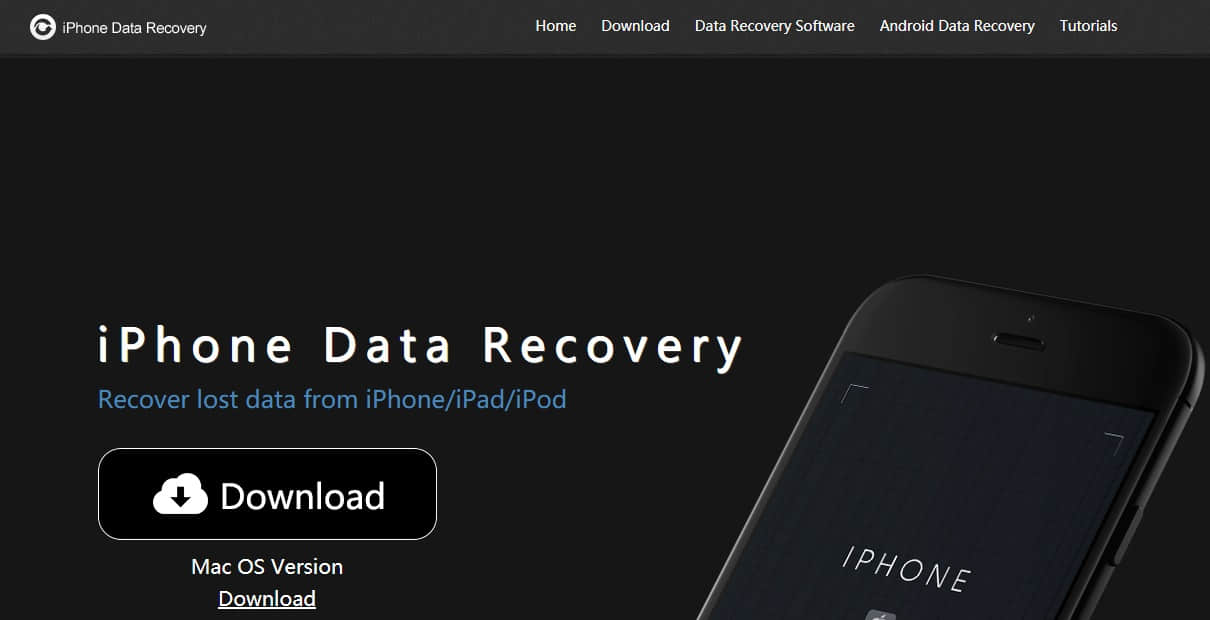
Free download and install Bitwar iPhone Data Recovery on your PC: https://www.bitwar.net/ios-data-recovery-software/. Bitwar iPhone Data Recovery software has two versions to support Mac OS or Windows OS. You need to choose one and install it on your computer based on your computer’s operating system.

Download Software

Tip before recovery:

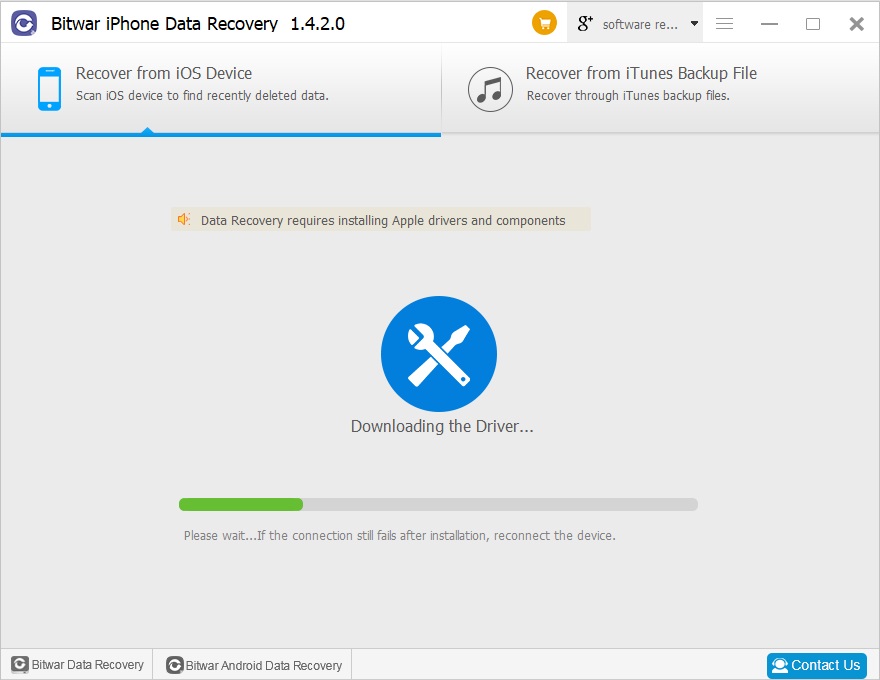
The first time to access the iPhone needs to install the necessary fruit and devices, with a time of 3-5 minutes, please be patient.

iPhone Data Recovery Software Full Version Free Download

Recovery Data Process:

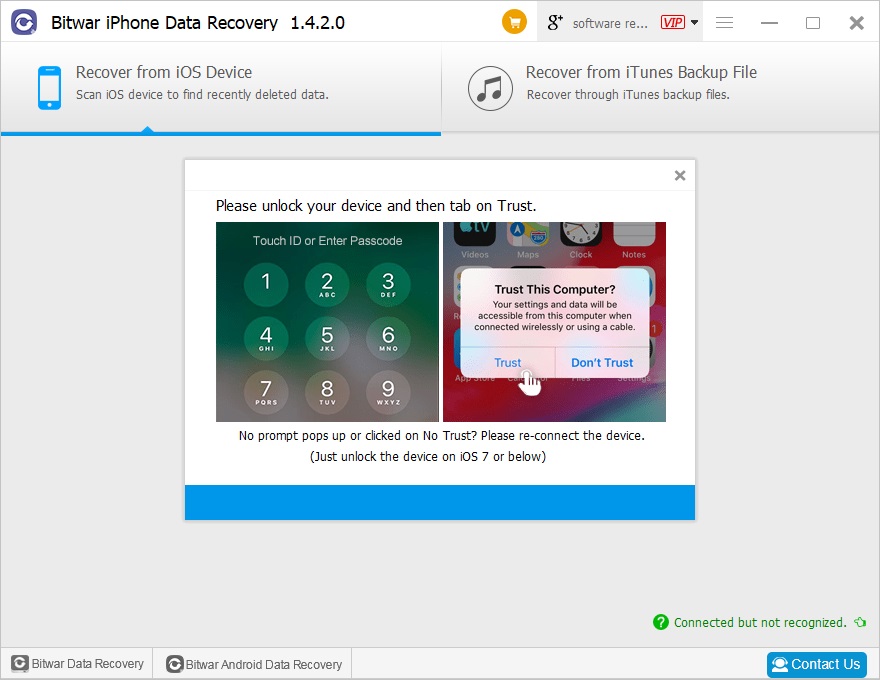
Step 1: Launch Bitwar iPhone Data Recovery and Connect iPhone to your Computer

Bitwar iPhone data recovery supports both Windows and Mac OS so that it can be used on Windows and Mac computer. In this step, connect your iPhone to the computer through the USB cable. Make sure iTunes is installed previously. Select the default recover mode “Recover from ios Devive.”

iPhone Data Recovery Software Full Version Free Download

Step 2: Select the recovered file type

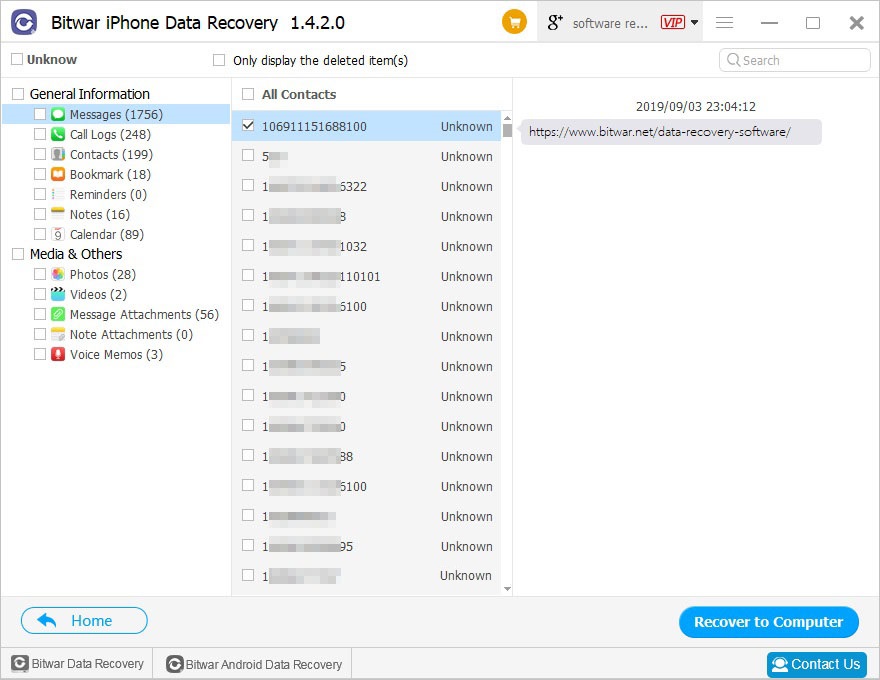
Step 3: Preview and recover data from iPhone

Preview and recover lost data

Please refer here for more about iPhone data recovery.

Fix “CHKDSK is not available for RAW Drives” Error

Summary: This article is going to explain to you the steps that can help eliminate the error “CHKDSK is not available for RAW Drives”. Follow the below steps to get rid of the issue.

At the onset, it is important to know what are CHKDSK and Raw Drives. CHKDSK stands for “Check Disk”, it is a command that runs in Command Prompt to validate the system’s integrity. The prime function of CHKDSK is to check for the errors in a disk and then fix them up.  RAW Drive is a hard drive partitioning, which implies that the Windows Operating System does not recognise the file system.

CHKDSK is not available for RAW drives

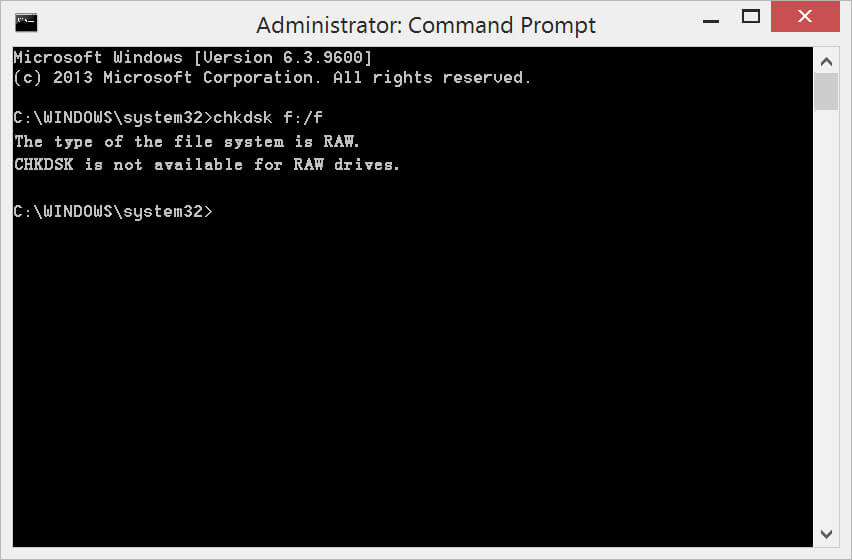
The error message “The type of the file system is raw, CHKDSK is not available for RAW Drives” is displayed when you run the command “CHKDSK” over raw USB flash drives, raw hard drives, raw pen drives and raw SD cards etc. when they are not working the way they are meant to work or simply when damaged.

What causes to give an error “CHKDSK is not available for RAW Drives”?

First of all, CHKDSK is found in all the versions of Windows like Windows XP, 7, 8 and 10. This error message in Windows often appears due to corrupted or damaged disk because of:

  • Unsafe ejection of a disk or a drive.
  • An antivirus attack.

Additionally, some of the common scenarios associated with RAW Drives are:

Don’t Miss: Quick Fix on How to Repair Hard Disk Not Detected By Computer

Possible ways to fix the error message stating “CHKDSK is not available for RAW Drives”

Given below are some of the solutions to fix “CHKDSK is not available for RAW Drives” for Windows XP, 7, 8 and 10.

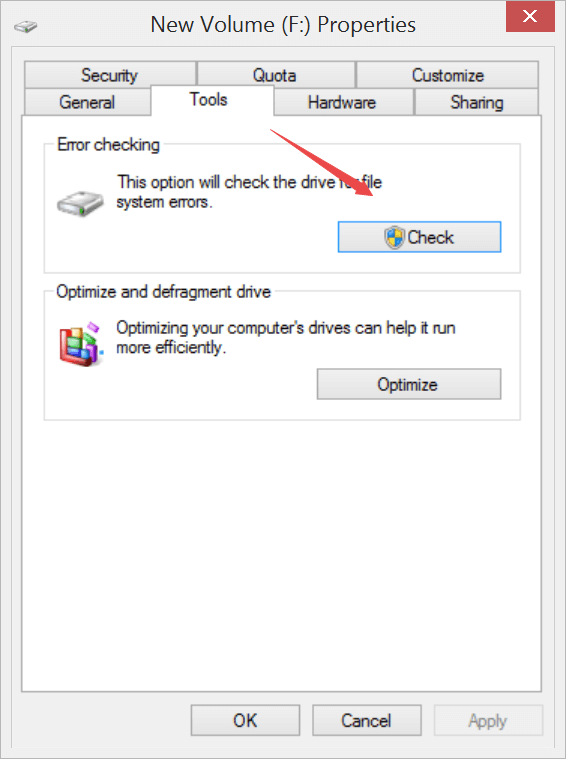
Solution 1:  Error Checking

Step1:  Enter “My Computer/This PC” and right-click on the RAW drive.

Step2:  Turn to Tools page and then Click “Check” from the Error-checking section.

Drive Error Checking

Step3. Wait for the system to scan your drive and then fix the CHKDSK is not available for RAW Drives without formatting.

Solution 2: Reformatting

It is the best solution when the RAW drive does not contain any critical data, and you don’t mind formatting it.

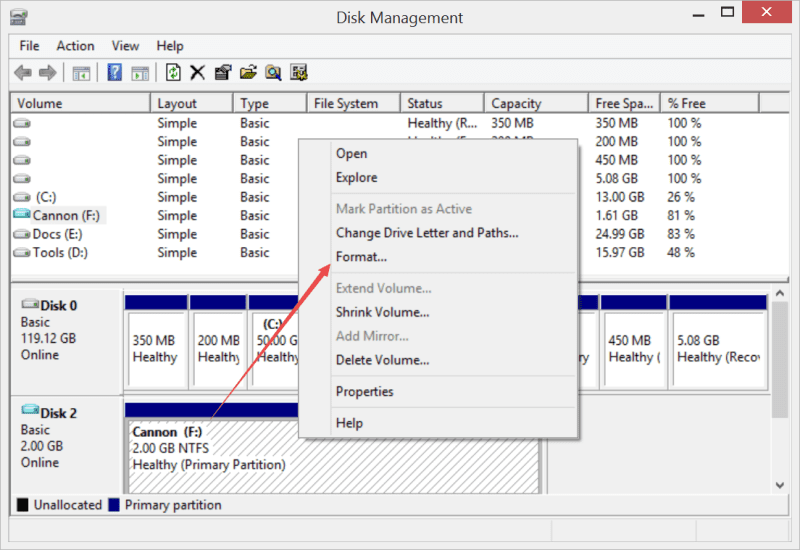
Step1: Press WIN key + R and type “Diskmgmt.msc” to run the Disk Manager,  and then right-click on the RAW Drive.

Step2: Select the option “Format”.

Format-using-Disk-Management

Step3: Now, choose the option “NTFS File System” and change it to other information (format options, volume label and allocation unit size).

Step4: After this, click on the “Start” button to reformat RAW Drive to NTFS.

What if you do have the vital data stored on the drive and you don’t want to lost them by formatting the disk, how can we retrieve inaccessible data? Don’t worry, we are having below methods to get back your data first and then fix the error.

Solution 3: Fix using Command Prompt

Recover Data without Format

Before you go ahead with this option to fix “CHKDSK is not available for RAW Drives”, it is advisable to recover important data from the RAW Drive. A free data recovery software will make the fix even simpler as there will be no risk of losing the precious data. Therefore, we would recommend using “Bitwar Data Recovery” software due to high reliability and safety for your data.

Let us first see the steps to recover data using Bitwar Data Recovery Software:

  1. Download Bitwar Data Recovery Software for both Mac and PC. After downloading, install the software on the system.
  2. Launch the software and click on the Drive this showing as NTFS_RAW. (RAW is the current status of your drive, and NTFS is the drive’s former type of file system). Hit “Next” to continue.
  1. Check on “Quick Scan” mode to recover lost files from the RAW partitioning or device, and then select the file types you want to recover.
  2. While the process of scanning, click on the option “Preview” to generate thumbnails for each file to confirm the files are still functional, if yes, hit on the Recover button to get back the files.

Please refer here for more about data recovery.

WPS/ PDF to Word Converter

How to Convert PDF to WPS?

Kingsoft Writer created WPS format which is a word document processor that is part of the Kingsoft Writer Software formats. You may be looking for a converter to help you convert PDF files to WPS. Deli PDF Converter has the tool to convert them for you.  Just follow with the tutorial below and you will learn how to convert PDF to WPS easily.

Remember to download the software from the official website to enjoy all the PDF tools safe and secure!

Install-Software.png

Steps to Converter PDF to WPS

Step 1. After installation, launch the software.

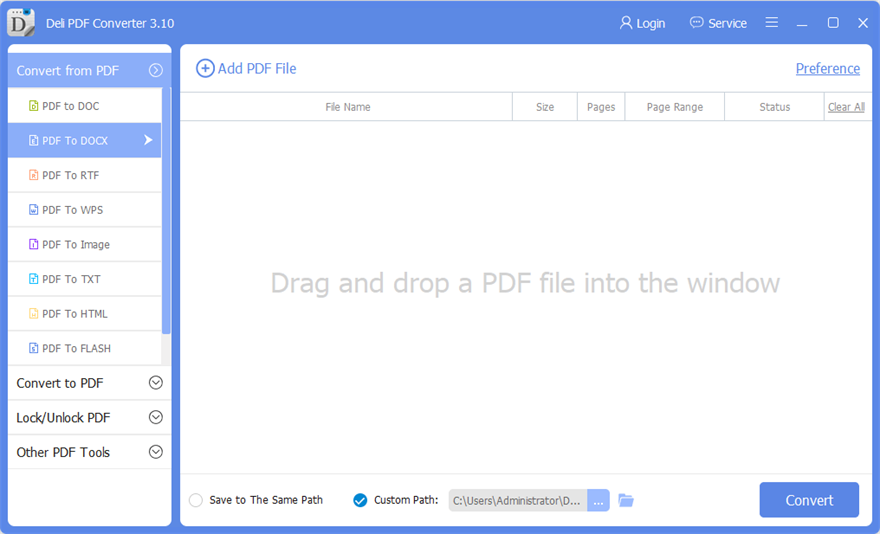
Main-Interface.png

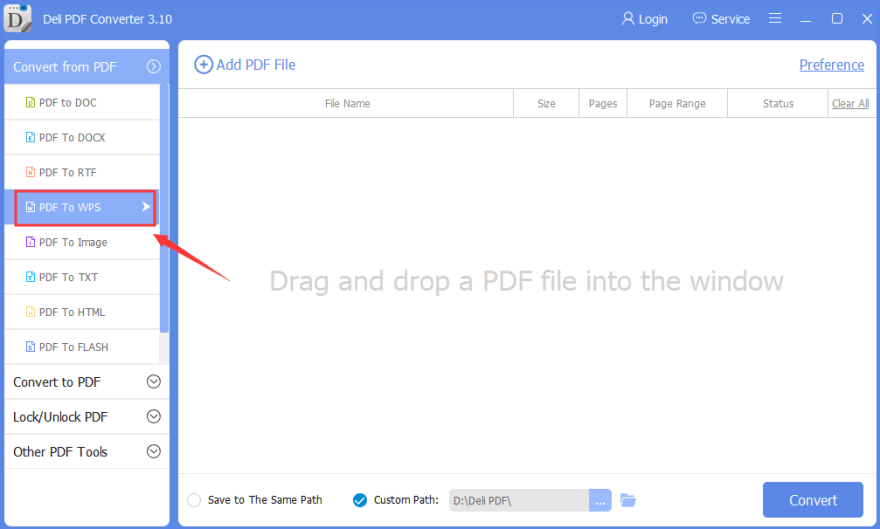
Step 2. At the main interface, choose “Convert from PDF” and “PDF to WPS.”

PDF-to-WPS.png

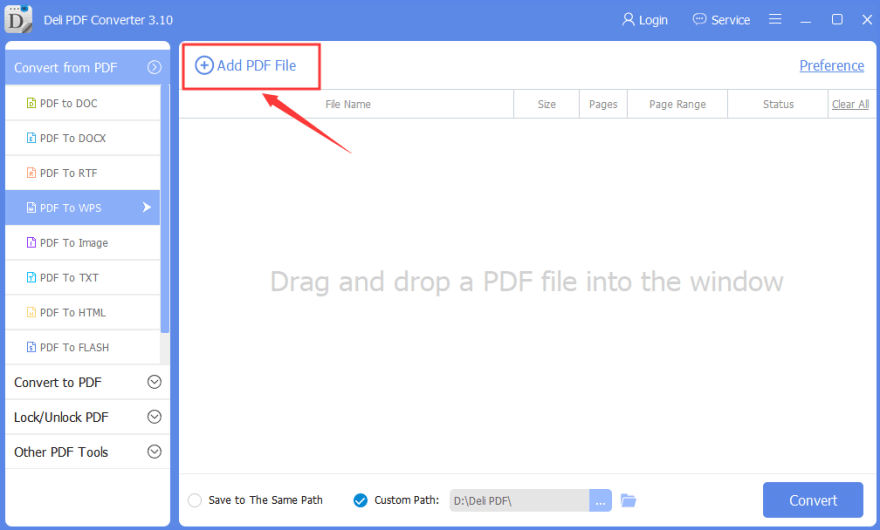
Step 3. Then, click “Add PDF File” to add in the PDF files that you want to convert.

Add-WPS-File.png

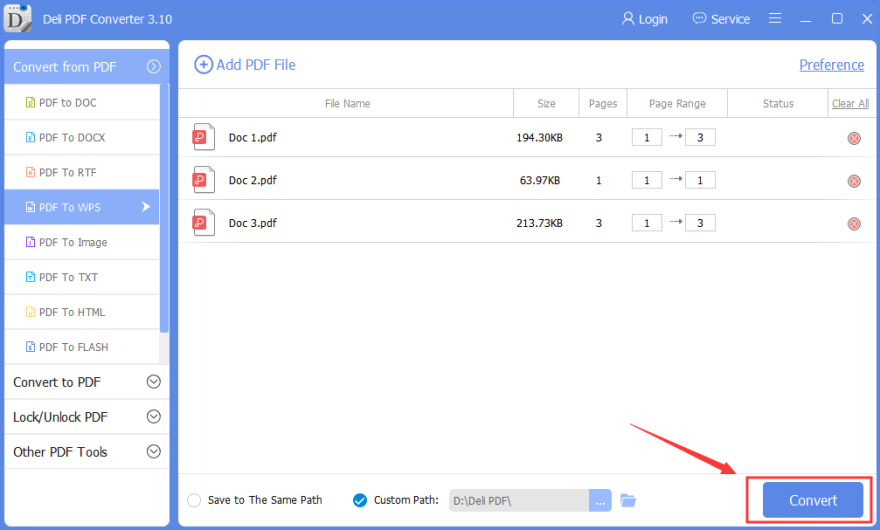
Step 4. After adding files, click “Convert” to start conversion.

Convert-PDF-to-WPS.png

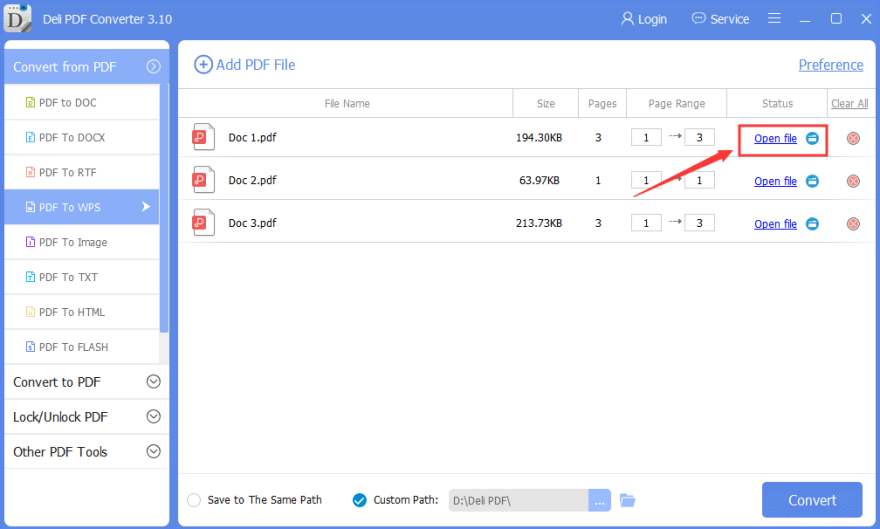
Step 5. Give some a few seconds for the PDF files to complete the conversion. Finally, you can click “Open Files” to open and preview the WPS format files.

Preview-WPS-file.png

Please refer here for more about PDF Converter.

Fix Recycle Bin Corrupted Error

Summary: This in-depth article is going to explain to you the ways to fix “Corrupted Recycle Bin”. Check out the solutions below, which will help you to fix the issue.

Recycle Bin is a directory or a folder that temporarily holds the deleted or removed items. When you delete any file from your computer system, it doesn’t get removed permanently from the hard drive; instead, it moves to the Recycle Bin and gets stored there.

Recycle Bin Corrupted Windows 10

These files can’t be accessed directly once they are transferred to Recycle Bin. In order to obtain them, one would need to restore these file to their original place and then use it.

Nonetheless, what if your screen flashes a message “Recycle Bin Corrupted”? A corrupted Recycle Bin won’t be emptied, nor will it allow you to restore deleted files to their actual location. But, do not worry! Below are some of the ways, which you can follow to fix corrupted Recycle Bin which is access denied.

What causes the error “Recycle Bin Corrupted”?

A large number of Windows10, 8 and 7 users logged the issue stating “Recycle Bin Corrupted”. It is a common problem among Windows users and many online forums are filled with related questions that are asking why the Recycle bin is access denied or the Recycle bin won’t empty after the corruption.

Given below are some of the possible causes that may lead to this concern.

  1. The issue with DLL (Direct Link Library).
  2. Incompatibility issues.
  3. Corrupted system.
  4. System forcefully shutdown.

Steps to Eliminate the Issue of Corrupted Recycle Bin

Here are some effective solutions to fix the Recycle Bin corrupted issue that can help you for sure. Just follow the below steps carefully:

#1 Reset Recycle Bin using CMD:

Step1: Click on start button and select “All Programs” tab.

Step2: Select the “Accessories” folder.

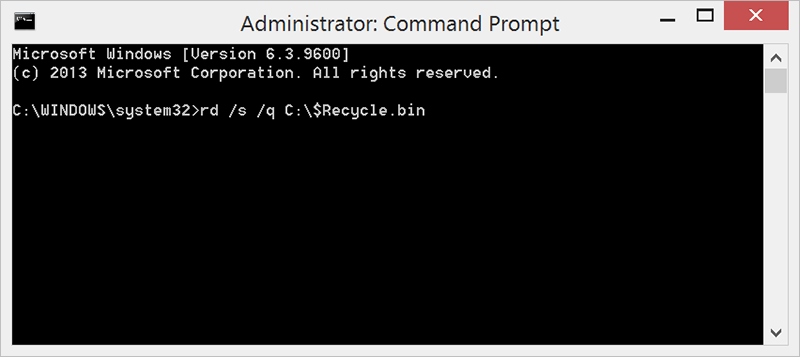
Step3: Now, right click on “Command Prompt” and choose the option “run as administrator”. [For Windows 8 or Windows 10 user, you can press WIN+X and choose Command Prompt(Admin).]

Step4: After this, type command “rd /s /q C:\$Recycle.bin” and hit on Enter.

Step5: Restart your computer system, once after restarting you will be able to use the Recycle Bin.

Recycle Bin Corrupted erro quick fix

The above solution is concerning the C drive. If you want to reset Recycle Bin for another drive, let’s say for D drive then, replace C in the command with the letter D.

Restore Data After Fixing the Error saying “Recycle Bin Corrupted” with Bitwar Data Recovery

There are scores of recovery tools and applications in the market, but selecting the best one is the prime concern. To make your job simpler, we would recommend using “Bitwar Data Recovery software” as it is capable of recovering deleted image, video, audio, email, files and much more.

It is compatible with Windows and Mac including external hard drives like memory cards, USB and digital camera, etc.

Moreover, it provides 3 steps recovery mode that you can simply recover data lost due to corrupted Recycle Bin. Check here to see how to process the data recovery.

Recycle Bin Recovery

This will let you save the retrieved data to any other storage drive.

Please refer here for more about Recycle Bin data recovery.

Design a site like this with WordPress.com
Get started