Summary: This in-depth article is going to explain to you the ways to fix “Corrupted Recycle Bin”. Check out the solutions below, which will help you to fix the issue.
Recycle Bin is a directory or a folder that temporarily holds the deleted or removed items. When you delete any file from your computer system, it doesn’t get removed permanently from the hard drive; instead, it moves to the Recycle Bin and gets stored there.
These files can’t be accessed directly once they are transferred to Recycle Bin. In order to obtain them, one would need to restore these file to their original place and then use it.
Nonetheless, what if your screen flashes a message “Recycle Bin Corrupted”? A corrupted Recycle Bin won’t be emptied, nor will it allow you to restore deleted files to their actual location. But, do not worry! Below are some of the ways, which you can follow to fix corrupted Recycle Bin which is access denied.
What causes the error “Recycle Bin Corrupted”?
A large number of Windows10, 8 and 7 users logged the issue stating “Recycle Bin Corrupted”. It is a common problem among Windows users and many online forums are filled with related questions that are asking why the Recycle bin is access denied or the Recycle bin won’t empty after the corruption.
Given below are some of the possible causes that may lead to this concern.
- The issue with DLL (Direct Link Library).
- Incompatibility issues.
- Corrupted system.
- System forcefully shutdown.
Steps to Eliminate the Issue of Corrupted Recycle Bin
Here are some effective solutions to fix the Recycle Bin corrupted issue that can help you for sure. Just follow the below steps carefully:
#1 Reset Recycle Bin using CMD:
Step1: Click on start button and select “All Programs” tab.
Step2: Select the “Accessories” folder.
Step3: Now, right click on “Command Prompt” and choose the option “run as administrator”. [For Windows 8 or Windows 10 user, you can press WIN+X and choose Command Prompt(Admin).]
Step4: After this, type command “rd /s /q C:\$Recycle.bin” and hit on Enter.
Step5: Restart your computer system, once after restarting you will be able to use the Recycle Bin.
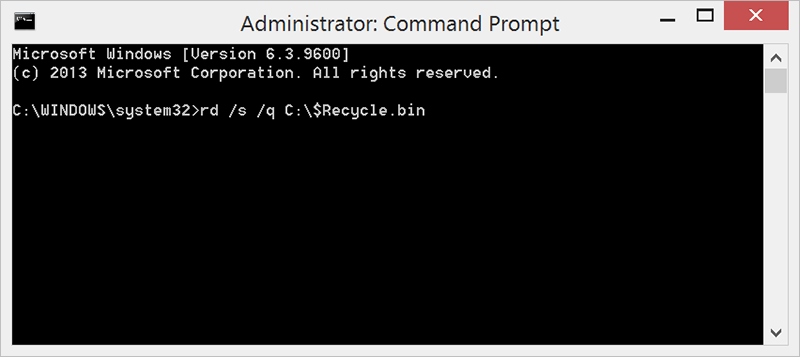
The above solution is concerning the C drive. If you want to reset Recycle Bin for another drive, let’s say for D drive then, replace C in the command with the letter D.
Restore Data After Fixing the Error saying “Recycle Bin Corrupted” with Bitwar Data Recovery
There are scores of recovery tools and applications in the market, but selecting the best one is the prime concern. To make your job simpler, we would recommend using “Bitwar Data Recovery software” as it is capable of recovering deleted image, video, audio, email, files and much more.
It is compatible with Windows and Mac including external hard drives like memory cards, USB and digital camera, etc.
Moreover, it provides 3 steps recovery mode that you can simply recover data lost due to corrupted Recycle Bin. Check here to see how to process the data recovery.
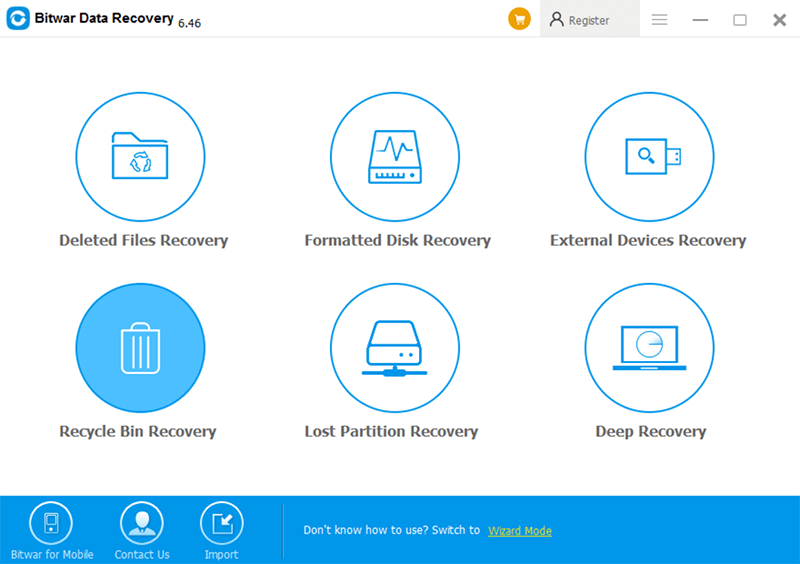
This will let you save the retrieved data to any other storage drive.
 Bitwar Data Recovery