Summary:
Sometimes, people may use diskpart delete partition for better management. However, where did the data in the deleted partition go? How can I get the data back? This article will tell you how to recover data from deleted partition.
https://www.bitwar.net/data-recovery-software/
All file storage devices, including the partition of the hard disk, external hard drives, USB flash drives, SD cards, memory cards, are vulnerable and prone to be deleted. In addition to the accidental deletion of partitions, you can also use the Diskpart command to delete the partition.
Diskpart is a useful system utility to create, format, resize or delete partitions as well as helping to fix partition.
Using the Diskpart to delete the partition
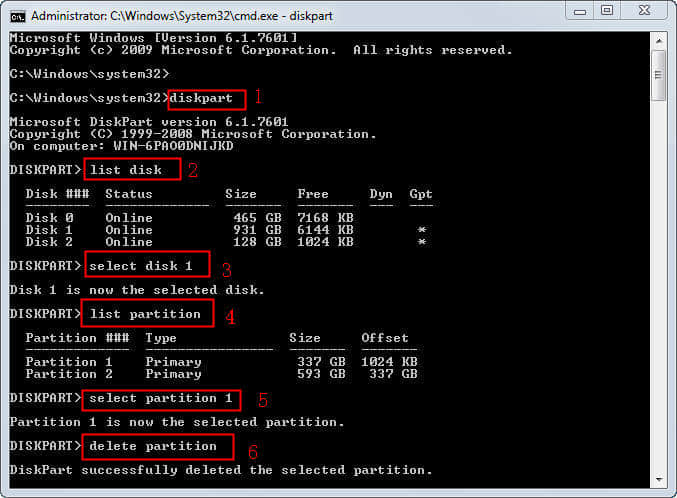
Diskpart is a disk management tool snap-in Windows, It executes tasks by using the command line (CMD). Diskpart delete partition is a good way to delete the partition with the syntax:
1. Open the Command prompt, type: diskpart.
2. At the diskpart prompt, type: list disk. Then, all the disks on your computer will be list, you should figure out the disk number of the disk from which you want to delete the partition.
3. Type: select disk n. “n” is the disk number. Select the disk which contains the partition you want to delete.
4. Type: list partition
5. Type: select partition n, “n” is the partition number. Here you need to select the partition which you want to delete.
6. Type:delete partition. Then, delete the partition using Diskpart will be shown as the following screenshot shows:
Anyway, deleting partition or formatting partition causes data loss. So do not try diskpart command until you have fully backed up files on the hard disk. And if you delete the partition by mistake, you should turn to data recovery as soon as possible.
How to recover data from deleted partition?
Bitwar Data Recovery is a powerful and effective data recovery software that can restore lost data causing by deleting, formatting, partition deleted, virus attacking, system crash or other unknown reasons under Windows 10/8/7, etc. Only 3 simple steps are needed to restore lost data.
Free download and install Bitwar Data Recovery Software on your computer: https://www.bitwar.net/ . It’s quick and convenient.
 Bitwar Data Recovery