Summary: This article explains how to recover data from formatted hard drive and using the best software to recover these files with 3 steps.
https://www.bitwar.net/data-recovery-software/
Did something go wrong while you were formatting your hard drive? Is there something not right with the backup, or perhaps there is no backup at all? Would you like an easy and simple way to get back the files that you lost?
Data Recovery Software
Recovering lost data through formatting or unintentional deletion is possible through data recovery software. They search the drive for your files and give you a way to recover them.
One of the easiest to use and free data recovery software we would like to present to you is Bitwar Data Recovery. It is a reliable, powerful file recovery programs that available on Windows 10 and earlier operating systems, Mac, and even on mobile (Android, iPhone).
This data recovery software is useful not just for recovering deleted files from a formatted hard drive. But it is also useful for recovering data lost by accidental deletion or even files deleted from viruses.
What’s more, it is so easy to use that it only has three simple steps! If you want to know how to recover data from the formatted hard drive, then the first step would be to download this software and install it.
Tips: Please DO-NOT installs the data recovery software in the same drive that you are scanning.
Steps to Recover Data from Formatted Hard Drive
Once you have installed the Bitwar Data Recovery software and have created a software account, you may proceed to the three-step process of recovering your deleted files.
Step 1: Select Partition or Drive
When you open the software, it will immediately detect all of the storage drives present in the computer and the connecting USB flash drive, SD cards, etc. Simply click the one you would like to scan and click “Next.”
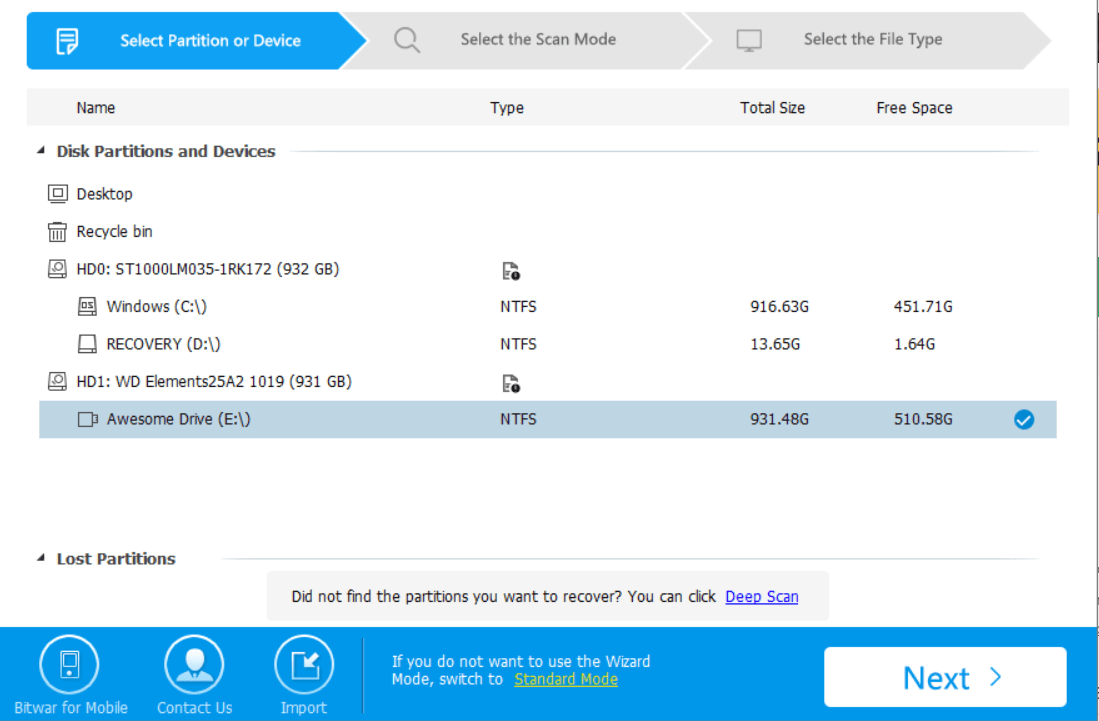
 Bitwar Data Recovery