Summary
This article offers the best hard disk recovery software – Bitwar Data Recovery to effortlessly recover whatever you lost on the hard disk.
https://www.bitwar.net/data-recovery-software/
How to Recover Data from Hard Disk?
1. First, download Bitwar Data Recovery software
Download it directly on the official website: https://www.bitwar.net/
2. Second, perform Bitwar Data Recovery software, and select Disk Partitions and Devices in the “Wizard mode” or select “Formatted Disk Recovery” in the “Standard Mode“.
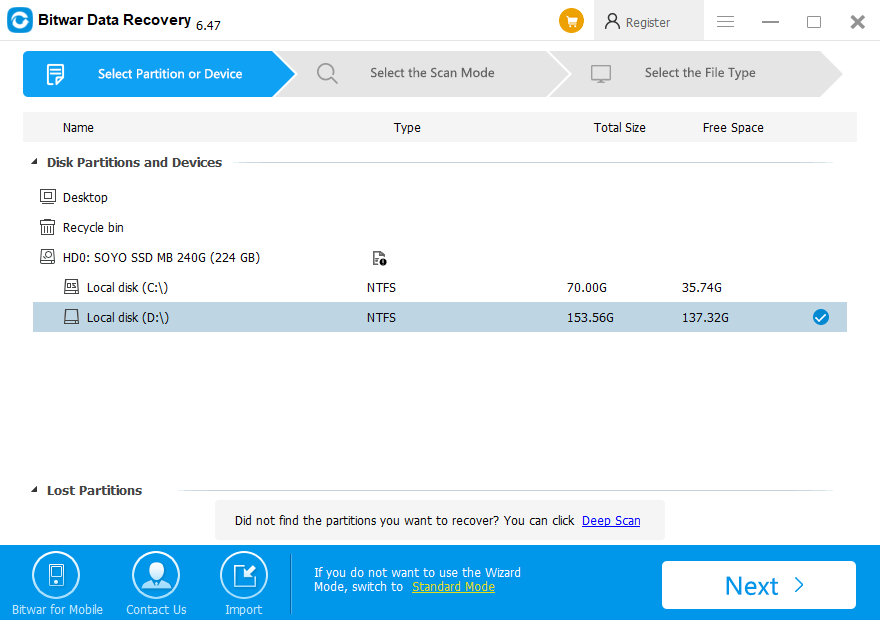
Bitwar Data Recovery supports the recovery of mistakenly delete hard disk files, incorrectly formatted disk, mistakenly delete u disk/memory card data, empty the Recycle Bin files, and hard disk partition after the disappearance of the hard disk files. It is worth mentioning that in the above five ways if there are still some files can not be recovered or can not be found, the Bitwar Data Recovery There is a deep recovery will help us to a more in-depth and meticulous search recovery.
3. Next, select the scan mode.
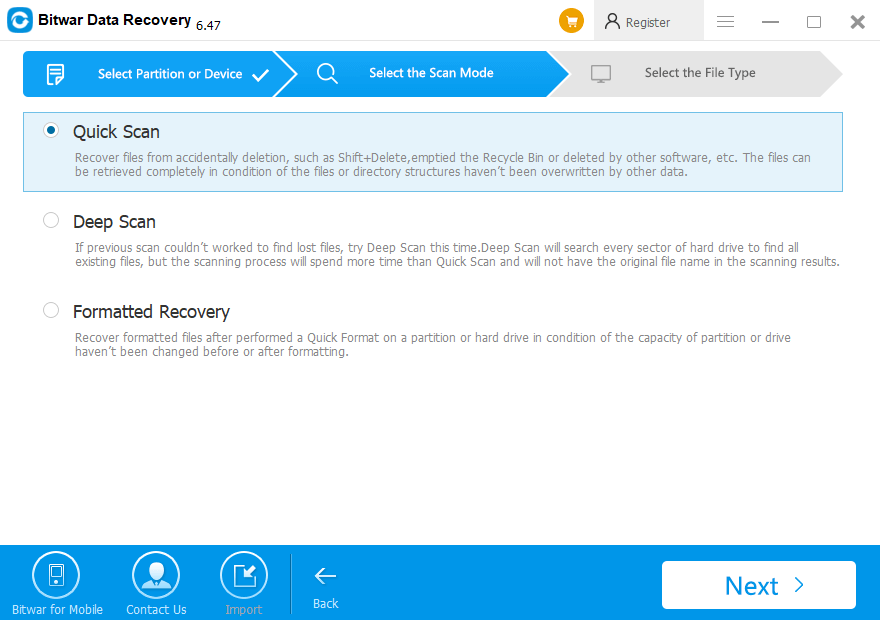
In Wizard Mode, Bitwar Data Recovery provides three scan modes for you:
- Quick Scan: the files can be restored completely with their original files or directory structures.
- Deep Scan: it will search every sector of the hard disk to find all existing files, which costs more time and will not show the original file name.
- Formatted recovery: retrieve formatted files after performing a Quick Format on the hard disk.
 Bitwar Data Recovery